Review stock submissionsbefore you upload.
Generate titles, descriptions, and keywords with Gemini or Claude. Review metadata quality and IP-risk warnings, then export CSVs for Adobe Stock, Shutterstock, and Freepik from one Windows app.
Google Gemini or Anthropic Claude
Batch review workflow
CSV export for major stock platforms
Submission-ready exports for contributors uploading to
 Adobe Stock
 Shutterstock
 Freepik
Why it matters
More than metadata generation.
StockMeta helps you review what should be submitted, not just generate text for every file.
Contributors need a faster way to separate stronger assets from weak or risky ones before export. The goal is not more text. The goal is cleaner batches, fewer surprises, and better submission confidence.
Common friction before upload
Weak or generic metadata slips into otherwise strong batches.
Possible logo, trademark, and policy issues get noticed too late.
Manual cleanup still eats time before every upload.
Weak files stay mixed into good batches until export time.
Contributors waste exports on files that still need review.
Core workflow
Review, refine, and export with more control.
StockMeta is designed around batch review confidence, not just one-click metadata generation.
Gemini + Claude
Generate stock-image titles, descriptions, and keywords with Google Gemini or Anthropic Claude. Choose your provider in Settings.
Choose Your AI Model
Discover available Claude image models, select one, or enter an exact model ID. Your saved model stays fixed throughout each batch.
Secure Provider Credentials
Save separate Gemini and Claude keys securely on your Windows device. Switch providers while keeping both credentials and preferences.
Submission Review Dashboard
Review file-by-file status like Ready, Needs Review, and Flagged before export.
Policy / IP Risk Warnings
Detect likely risky files and review advisory warnings before submission.
Metadata Quality Checks
Spot weak titles, duplicate keywords, missing details, and other quality issues.
Batch Workflow Controls
Approve, exclude, and review files in bulk instead of editing everything manually.
Multi-Platform CSV Export
Export cleaner submission-ready CSVs for Adobe Stock, Shutterstock, and Freepik.
Prepare Files
Convert and prepare assets for platform submission from inside the same workflow.
Your provider. Your model.
Set up Gemini or Claude in minutes.
Open Settings in the Windows app to connect your own API key. Gemini remains the default, and switching to Claude keeps your existing Gemini settings and credentials.
- 1
Choose an AI provider
Select Google Gemini or Anthropic Claude under AI Provider.
- 2
Save and test your API key
Enter your key, click Save Key, then Test Connection. Claude connection checks do not generate content.
- 3
Choose a model and save
For Claude, click Refresh Models beside AI Model. Select a returned model or type an exact model ID, then click Save Settings.
Provider API usage is billed separately from StockMeta access. A Claude chat subscription does not include API usage.
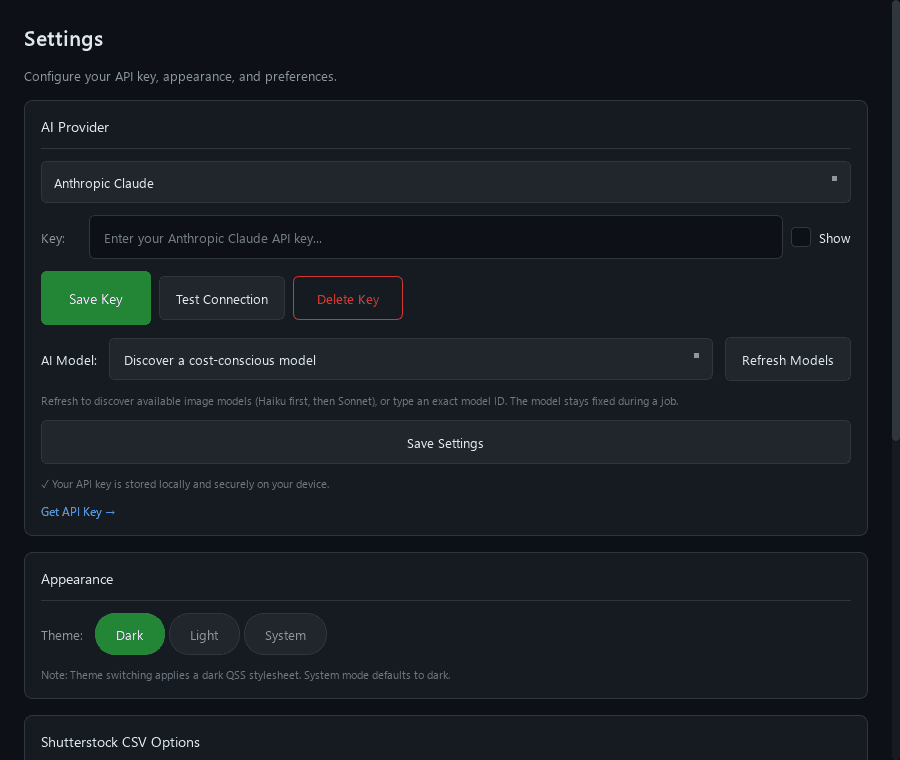
AI Model is directly below the API-key buttons in the desktop app. Available model names appear after you refresh with your key.
Which Claude model will StockMeta use?
It uses the model you save in AI Model. If none is saved, StockMeta discovers currently available image-capable models, prefers Haiku, then Sonnet, and saves its choice. The model stays fixed during the job; it is never silently changed after an API error.
What changes when I switch providers?
Your saved keys and preferences remain available. Both providers use the same metadata checks, IP-risk review, results, and CSV exports. Running jobs keep their original provider and model. StockMeta login and Pro feature requirements still apply.
Workflow
How it works
A practical submission workflow that keeps review decisions in front of export.
Sign in and choose your AI
Install the Windows app, sign in, then choose Gemini or Claude in Settings. Save your own API key and select your model.
Analyze a submission batch
Generate metadata with your selected provider, then review quality, export status, and IP-risk signals in one place. Cancel and resume with checkpoints when needed.
Review flagged items and metadata issues
Inspect warnings, fix weak metadata, and keep weaker files out of your export set.
Export cleaner approved results
Save submission-ready CSVs once the batch looks right for Adobe Stock, Shutterstock, or Freepik.
Desktop preview
See the workflow in action.
Review the batch, inspect flagged items, prepare files, and manage access from one desktop workflow.
Who it's for
Built for practical stock workflows.
StockMeta is aimed at contributors who work in batches and want better control before submission.
Stock photo contributors
Review photo batches before upload and keep submission quality consistent.
Vector and icon creators
Check titles, keywords, and risky references across illustrations, icons, and EPS assets.
Batch uploaders
Move through bigger submission sets faster without treating every file the same.
Contributors who want more control
Decide what gets exported, what stays in review, and what should be excluded.
Access
Simple access for serious contributors
Install the Windows desktop app, sign in with your account, and activate the level of access that fits your submission workflow.
Free Access
Install the app, sign in with your email, and use the core StockMeta workflow to evaluate fit before upgrading.
Windows desktop app
Email login required
Core workflow access to get started
Bring your own Gemini or Claude API key
Upgrade path to the full workflow
Pro Access
Unlock the full contributor workflow for cleaner multi-platform batch review, export control, and active access management.
Active Pro access required
Full multi-platform workflow
Advanced review controls
Support and activation through Telegram and My Account
Login required. Windows desktop app. Active access required for Pro features.
Trust and safety
Built for review confidence before export.
Warnings are advisory and should be reviewed before submission.
Review decisions stay in your workflow before export.
Gemini and Claude API keys are stored securely on your device, never in your website account.
Built for practical contributor workflows.
Final check
Review your batch before you upload.
Use StockMeta to catch issues earlier, clean up metadata faster, and export with more confidence.